AI Operations Manager for car dealerships
Answer every lead in minutes.Move every unit before it ages.
VERA answers internet leads, books and confirms test drives, follows up on everyone who left the showroom without buying, proposes price drops on aged units, and finds equity in your service drive, while your managers stay in complete control by approving every action.








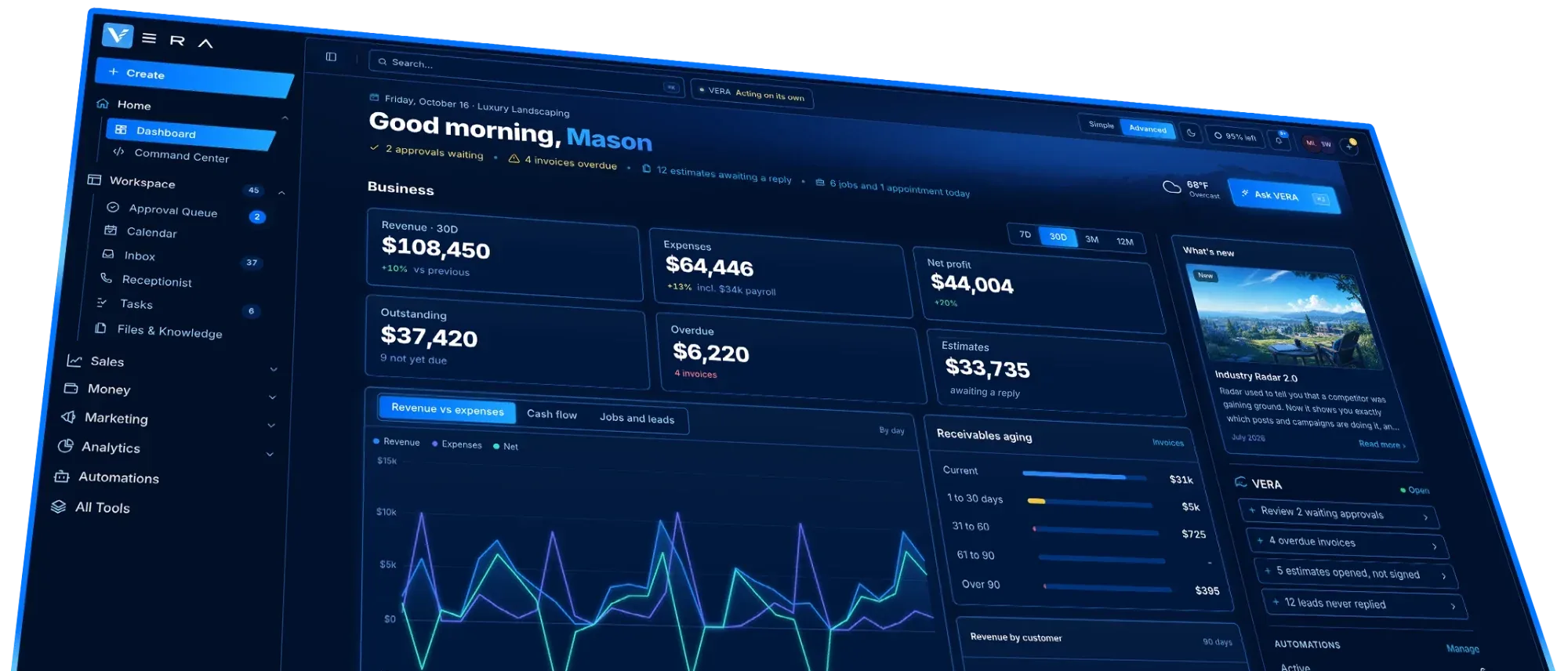
Automate
Eliminate manual work and reduce time to value.
Analyze
Turn your data into clear, actionable insights.
Secure
Encrypted connections and credentials. You approve by default.
Scale
Built for today, ready for what's next.
Built for franchised stores and independent lots, from one rooftop to several
Stop letting good deals drive off the lot.
The buyers are already in your CRM, your showroom log, and your service lane. They get lost between a busy floor, a slow reply, and a follow-up nobody had time to make.
Leads go cold in minutes
An internet shopper asks three stores the same question. VERA drafts the reply with the unit confirmed and two test-drive times, so a salesperson sends it while the lead is still warm.
Showroom visitors never hear back
Someone drove the car, said they would think about it, and left. VERA drafts the follow-up with the exact unit and the numbers they saw.
Units age on the lot
Every day a unit sits costs you floorplan and gross. VERA flags units by days on lot and proposes a price drop for the manager to approve.
Appraisals are inconsistent
Trade numbers depend on who walked the car. VERA writes up every appraisal the same way, with photos, recon notes, and the number your manager signs.
Equity sits in the service lane
Customers whose trade is worth more than they owe are getting an oil change right now. VERA finds them and drafts the handoff to sales.
Leases mature without a call
Lease customers drift to another store when nobody reaches out before maturity. VERA drafts the lease-end letter months ahead.
Your store runs on approval.
Three simple steps. Nothing happens automatically unless you turn it on.

Tell VERA what you need. What comes back is a finished document, not a blank form.
8 documents car dealerships actually send, set up with your business details, your pricing, and your branding.
Aged units · 14 price drops proposed
“Which units are past 60 days on the lot?”
Every aged unit with its days on lot, holding cost, and front gross, and a proposed price drop for each, waiting on the manager's approval in the Lot workspace.
Equity list · 6 handoffs drafted
“Who in today's service lane has equity?”
Service customers whose estimated trade value beats their payoff, each with a suggested newer unit, an estimated payment, and a handoff note for a salesperson.
Quote · 3 payment options
“Build a payment quote for Sam on stock 4471.”
Loan and lease options side by side with the trade, fees, and tax, marked as estimates and held on the desk for the manager before Sam sees them.
VERA can work. You still control what leaves the business.
The same gate applies to every car dealership workflow on this page.
- 01VERA prepares
Drafts the quote, the follow-up, the invoice, the schedule change.
- 02You review
See the numbers, the wording, and exactly who it goes to.
- 03Approval
Approve, edit, or decline. Let the routine ones run on your rules.
- 04Customer
Only approved work ever leaves the business.
You approve by default
Every action is a proposal first, unless you switch on Auto-Pilot or the receptionist.
- No surprise charges
- Start with no card. Nothing is charged when the trial ends unless you choose a paid plan.
- No lock-in
- Export your data, disconnect any tool, any time.
- Encrypted and private
- TLS in transit, tokens encrypted at rest, never sold.
VERA for Car Dealerships, in plain terms.
The questions people ask before they sign up, answered without the sales pitch.
What is VERA?
VERA is an AI business operations assistant for car dealerships. It prepares quotes, invoices, follow-ups, scheduling changes, marketing content, customer messages and reports using the tools your business already uses. VERA works approval-first: it drafts the work and shows it to you, and nothing is sent, posted, booked or charged until you approve it, unless you switch on Auto-Pilot or the receptionist.
Who is VERA for?
VERA is built for owner-operated and small-team businesses that run on jobs, quotes and invoices, and for the person in that business who does the office work after hours. It ships tailored setups for trades and home services, professional services, agencies, property and real estate, retail, hospitality, healthcare and auto repair.
How does VERA work?
VERA follows four steps: propose, approve, execute, log. You describe what you need in plain English, or VERA spots the work itself from your jobs and messages. It drafts the result and puts it in an approval queue. You approve, edit or reject it. Only then does VERA send it, and it records what it did.
Will VERA contact my customers without my permission?
No. Every message, quote, invoice, post and reminder that leaves your business waits in an approval queue until you approve it. You can turn on automatic sending for specific routine tasks, but only under rules you set yourself, and the default for everything is off. Every action VERA takes is written to an activity log you can read.
What software does VERA work with?
VERA connects to the accounting, calendar, payment, messaging, review and social tools most small businesses already run, including QuickBooks, Google Calendar, Gmail, Outlook, Stripe, Square, Instagram, Facebook and Mailchimp. You connect a tool by signing in to it, not by pasting API keys, and you can disconnect any of them at any time.
How much does VERA cost?
VERA has a free tier and four paid plans: Starter at $49 a month, Pro at $99 a month, Business at $199 a month and Agency at $399 a month. Every plan carries a month of AI work, connected integrations, scheduled tasks and team seats, and they differ by how much of each. The cheapest paid plan is Starter at $49 a month, and annual billing costs less than monthly.
What does VERA not do?
VERA does not act on your behalf without approval unless you switch on Auto-Pilot or the receptionist, and it does not replace your accountant, your lawyer or your licensed trades work. It does not file your taxes, sign contracts for you, or make decisions about hiring or firing. It is a web application only, with no desktop install, and it is sold in the United States.
Most popular with dealerships.
Connect your listings, phones, social accounts, and accounting so VERA works from your real leads, inventory, and customers.
Sign in once, no API keys. VERA reads only what you approve. Logos indicate available integrations, not partnerships.
Browse all 160 integrationsOne application for almost everything the business runs on.
Quoting, jobs, invoicing, customers, scheduling and marketing in one place, sharing the same data. No stack of six tools that do not talk to each other, and no re-typing the same job into three of them.
Sales
- Leads and pipeline
- Estimates and proposals
- Customers and CRM
- Jobs
Money
- Invoices and payments
- Expenses
- Mileage
- Financials
Work
- Scheduling and calendar
- Tasks
- Team
- Files and knowledge
Growth
- Content and social
- Reports
Missing something? We are proud to build it.
If a feature is missing and it would help a large part of our customer base, we add it. Tell us what you are stuck doing somewhere else and it goes on the roadmap. The requests that would help the most businesses get built first, and they ship to everyone on your plan at no extra cost.
Is VERA the right call for you?
Including the cases where the answer is no. Those are the ones worth reading.
Is VERA right for my business?
VERA fits best when the office work is the bottleneck: quotes going out late, follow-ups not happening, invoices sitting unpaid, and nobody on payroll to chase them. It suits car dealerships with one to about twenty-five people. If your admin is already fully covered by staff you trust, VERA has less to add.
How is VERA different from a general AI assistant like ChatGPT?
A general assistant writes text in a chat window and then you copy it somewhere. VERA is connected to your business: it reads your real jobs, customers, quotes and invoices, produces work inside those records, and can send it once you approve. It also keeps an approval queue and an activity log, which a chat window has no concept of.
How is VERA different from hiring a virtual assistant?
A virtual assistant is a person you hire, train, schedule and pay by the hour, typically several hundred to a few thousand dollars a month. VERA is software starting at $49 a month that works instantly, at any hour, and never needs handover notes. A person handles judgment and phone calls better; VERA handles volume and consistency better.
Is VERA safe to use with customer data?
Connector credentials are encrypted at rest, traffic is served over HTTPS, and you can disconnect any integration at any time to revoke access. VERA reads only what you connect and only writes what you approve. You can export your data and delete your account. The published security page states plainly what is in place and what is not yet.
Can I try VERA before paying?
Yes. There is a free tier that runs with no payment details, and a 7-day trial of the Business feature set with no card. Nothing is charged unless you choose a paid plan. You can cancel at any time and export your data on the way out.
Longer side-by-side write-ups: VERA compared with hiring an office administrator, VERA compared with a virtual assistant service, VERA compared with a general AI chatbot, and every VERA comparison. Plan detail and current prices are on the VERA pricing page.
Plans that grow with your store.
Every plan starts with a free trial. Below are VERA's standard plans, pick the one that fits your store.
Starter
Perfect for an independent used-car lot
Pro
For stores with a sales floor and a service drive
Business
For franchised stores running a BDC
Agency
For dealer groups with several rooftops
Starter
For solo business owners testing VERA
Billed monthly · cancel anytime
Draft and approve everyday work in one place.
Start free trialNo credit card required. Cancel anytime. You keep your data and integrations.
- Team members
- Just you
- Connected integrations
- 5 accounts
- Automation
- Manual approval
Pro
For active small businesses
Billed monthly · cancel anytime
Run recurring campaigns and lead workflows on autopilot, with approval.
Start free trialNo credit card required. Cancel anytime. You keep your data and integrations.
- Team members
- 3 included, add more
- Connected integrations
- 15 accounts
- Automation
- Auto-pilot + guardrails
Business
For growing operations running more than one business
Billed monthly · cancel anytime
Run a few businesses and a bigger crew with roles and permissions.
Start free trialNo credit card required. Cancel anytime. You keep your data and integrations.
- Team members
- 10 included, unlimited extra
- Connected integrations
- 50 accounts
- Automation
- Advanced + roles
Agency
For agencies and operators running a portfolio
Billed monthly · cancel anytime
Every business you run, one approval queue, no monthly cap on automatic work.
Start free trialNo credit card required. Cancel anytime. You keep your data and integrations.
- Team members
- 25 included, unlimited extra
- Connected integrations
- Unlimited
- Automation
- Uncapped + roles
Starter
- Team seats included
- 1 (you)
- Businesses under one account
- 1
- Scheduled or automated tasks
- 25 / mo
- Approval workflow
- Manual approval
- Social, email & reply drafting
- Research + proposal drafts
- Basic
- Content calendar + scheduling
- –
- Recurring workflows & auto-pilot rules
- –
- Extra seats beyond the included ones
- –
- Reusable workflow templates
- –
- Approval roles & team permissions
- –
- Task history
- 30 days
- Support
- Standard
Pro
- Team seats included
- 3
- Businesses under one account
- 1
- Scheduled or automated tasks
- 150 / mo
- Approval workflow
- Advanced + auto-pilot rules
- Social, email & reply drafting
- Research + proposal drafts
- Full
- Content calendar + scheduling
- Recurring workflows & auto-pilot rules
- Extra seats beyond the included ones
- Up to 10
- Reusable workflow templates
- –
- Approval roles & team permissions
- –
- Task history
- 6 months
- Support
- Priority
Business
- Team seats included
- 10
- Businesses under one account
- 3
- Scheduled or automated tasks
- 1,500 / mo
- Approval workflow
- Advanced + roles
- Social, email & reply drafting
- Research + proposal drafts
- Full
- Content calendar + scheduling
- Recurring workflows & auto-pilot rules
- Extra seats beyond the included ones
- Unlimited
- Reusable workflow templates
- Approval roles & team permissions
- Task history
- 12 months
- Support
- Priority
Agency
- Team seats included
- 25
- Businesses under one account
- 10
- Scheduled or automated tasks
- No monthly cap
- Approval workflow
- One queue, every business
- Social, email & reply drafting
- Research + proposal drafts
- Full
- Content calendar + scheduling
- Recurring workflows & auto-pilot rules
- Extra seats beyond the included ones
- Unlimited
- Reusable workflow templates
- Approval roles & team permissions
- Task history
- 12 months
- Support
- Priority
Start free for 7 days. Upgrade any time to unlock your plan’s full allowance, automations, integrations, and team features. No commitment during your trial. What a plan covers
- Free plan
- Where an account lands if the trial ends without a plan: 3 approved actions every 30 days, one connected integration, nothing deleted.
What a plan covers
Every plan carries a month of AI work. Everything you do with your own records is unmetered, so the only thing a heavy month can slow down is new drafting.
Uses your month of AI work
- Drafting a quote, an estimate, or a material takeoff
- Writing a customer reply, a follow-up, or a proposal
- Posts, captions, and a content calendar written for you
- Reading an invoice or a receipt you scanned in
- Research on your market and your competitors
- Reports and analysis of how the business is doing
Never touches it
- Sending a quote or an invoice you already approved
- Taking a payment and recording what came in
- Jobs and appointments moving through the calendar
- Reading, editing, and exporting your own records
- Connecting a tool, and everything it syncs in
- Adding people to the team and setting their access
Good to know
Open any question for the detail.
What are the plan limits?
Each plan includes a set number of seats, connected integrations, and scheduled tasks (see each card). Approval and automation capabilities also step up by plan.
What happens in a really busy month?
If you reach the end of a month's AI work, new drafting pauses and nothing else changes. Your data stays put, everything you already approved still runs, and your allowance refills at the start of the next billing cycle.
What do I get during the 7-day trial?
Enough AI work to put VERA through a real week of your own jobs, which is less than a paid month. Upgrade any time and your plan's full allowance and features unlock immediately.
How do I know how much I have left?
Your account header shows how much of the month is left, and the Usage page lists every job VERA has run and what it took. Nothing is spent without appearing there.
Frequently asked questions.
Will VERA reply to leads on its own?
No, not unless you switch on Auto-Pilot or the receptionist. Otherwise, VERA never sends a lead reply, a price, or an offer by itself. It drafts everything and waits for a salesperson or manager to approve, edit, or decline.
Does VERA change prices on my inventory?
Only with approval. VERA flags units by days on lot and proposes a price drop for each, never below cost, recon and a minimum gross before 90 days. A manager approves the new price before it changes.
Can it build payment quotes?
Yes. VERA builds loan and lease estimates with the trade, fees, and tax for the desk to review. They are always marked as estimates: VERA does not approve credit or submit credit applications.
How does equity mining work?
VERA compares a customer's estimated trade value with their estimated payoff and lists the ones with equity, starting with whoever is in the service lane today. Each gets a drafted upgrade offer and a handoff note for a salesperson.
Does it work for an independent used-car lot?
Yes. Lead replies, test drives, aged inventory, trade-in appraisals, vehicle posts, and review requests work the same for a single lot as for a franchised store. Lease-end and factory recall outreach simply stay off if you do not need them.
Can it help the service department too?
Yes. VERA drafts service reminders, recall notices, and follow-ups on declined work, and asks for a review after the repair order closes, all queued for approval.
Can I review everything before it happens?
By default, yes, unless you switch on Auto-Pilot or the receptionist. VERA is approval-first by design: propose → approve → execute. Nothing external happens without your say-so, and every action is logged.
Still have questions? Talk to us.
Not quite your business?
VERA is set up differently for every trade. Pick the one that fits yours.
Contractors & Trades
Professional Services
Property & Real Estate
Retail & Hospitality
Beauty, Wellness & Fitness
Events, Creative & Education
Stop losing the buyers already in your CRM.
See how VERA answers leads, moves aged units, and finds equity in your service drive, while your managers approve every move.
- No credit card required
- You approve by default
- Cancel anytime
By state
VERA for car dealerships, state by state
The product is the same everywhere. What changes is the paperwork: the office that takes your filing, the fee, the report deadline, and how wages are withheld. Each page below carries the real figures for that state.